
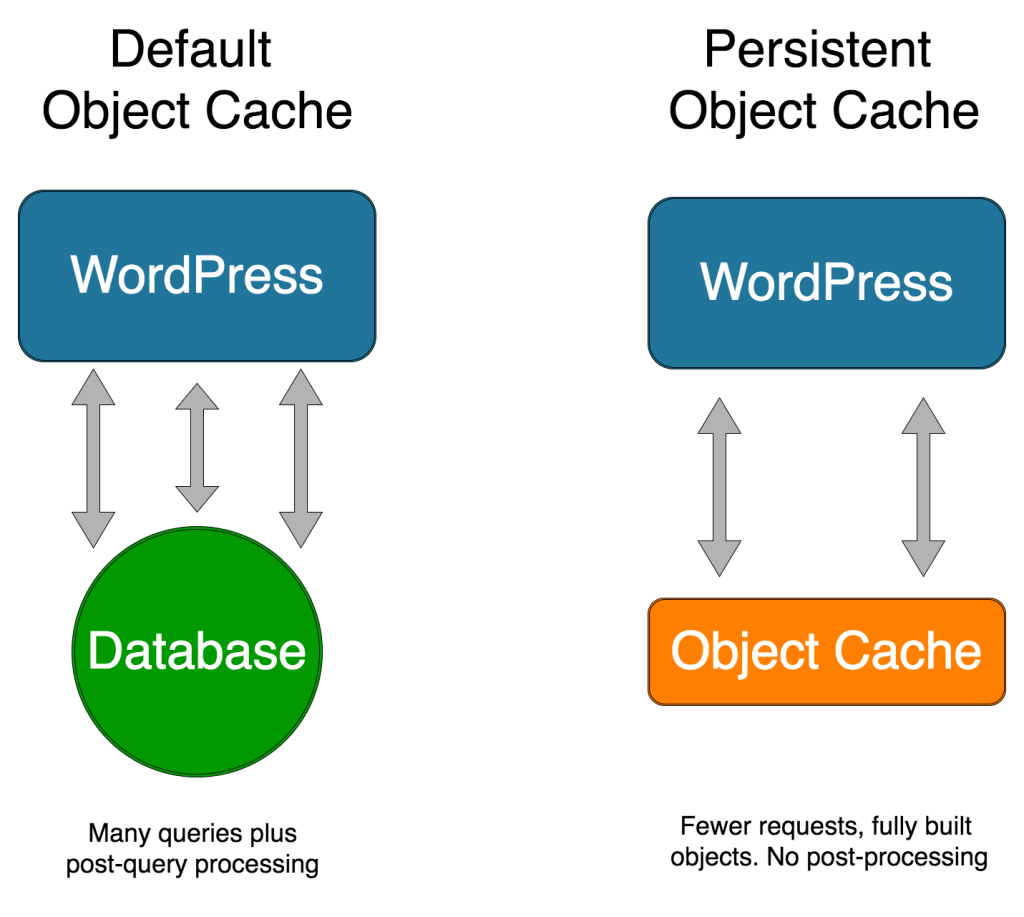
If you’ve ever dug into WordPress performance settings, you’ve probably stumbled upon this quote:
“WordPress includes its own implementation through the WP_Object_Cache class. By default, this cache exists only during a single request (runtime cache).”
It sounds incredibly technical, almost like ancient Latin for non-developers. But don’t let the jargon fool you. This hidden mechanism is actually one of the main reasons your WordPress site doesn’t crash every time a page loads.
Let’s break down exactly what this means in plain, human English.
The Analogy: The Chef, the Pantry, and the Prep Table
To understand how WordPress handles data, imagine your website is a busy restaurant:
- WordPress is the Head Chef.
- The Database (MySQL) is a locked pantry down in the basement.
- The Object Cache is the chef’s prep table right next to the stove.
Here is exactly what happens every single time a visitor clicks a link on your site.
Step 1: The Table is Empty
A visitor requests a blog post. At this exact millisecond, the Chef (WordPress) rolls up his sleeves. His prep table (the default WP_Object_Cache) is completely clean and empty.
Step 2: The Long Walk to the Basement
The Chef starts building the webpage from top to bottom. First, the website header needs your Site Logo.
- The Chef looks at his prep table—nothing there.
- He walks all the way down to the basement pantry (Database), unlocks it, grabs the logo, and runs back upstairs.
- The Magic Move: He places the logo on the customer’s plate, but he also leaves a copy of it on his prep table.
Step 3: Instant Retrieval
As the Chef continues building the page, he reaches the footer. The footer also needs your Site Logo.
- This time, the Chef doesn’t walk down to the basement.
- He looks at his prep table, sees the copy he saved two milliseconds ago, and snaps it instantly onto the plate.
- The Result: Time saved, server energy preserved.
Step 4: Clearing the Table
The page is fully built and sent to the visitor’s browser. In that exact fraction of a second, WordPress takes everything left on the prep table and throws it in the trash. The table is wiped completely clean.
When the next visitor arrives, the Chef starts with a blank table and must walk down to the basement pantry all over again.
Why is it Called “Object” Caching?
In your database, website information is stored as raw pieces of text and numbers scattered across different tables—like disconnected Lego bricks in a box.
To display a single blog post, WordPress has to fetch the title from one table, the text from another, and the author’s name from a third. It then builds a complete, organized package called a Post Object (known in code as WP_Post).
Object Caching means WordPress saves this fully assembled Lego structure on the prep table. It refuses to rebuild the exact same object twice during a single page load.
Object Cache vs. Page Cache: What’s the Difference?
It is easy to confuse these two terms, but they do completely different jobs:
- Page Caching (e.g., WP Rocket, LiteSpeed Cache): This takes a complete snapshot (photograph) of the finished page. It’s incredibly fast, but it doesn’t work well for dynamic elements like shopping carts or user profiles.
- Object Caching: This caches the individual internal parts of the page (menus, widgets, specific queries). It is perfect for dynamic websites because WordPress can quickly assemble a unique page for each user using pre-built parts.
What Happens When You Update Something?
If you edit a post in your admin dashboard and click “Update”, WordPress prioritizes accuracy.
- It immediately updates the master file in the basement pantry (Database).
- It triggers a built-in command (
wp_cache_delete()) that instantly throws away any old copies sitting on the prep table. - Because the default cache wipes clean at the end of the request anyway, there is zero risk of visitors seeing outdated content on your site.
The Big Limitation (and How to Fix It)
By default, this “prep table” cache only lives for a single request (one page load). It clears out instantly, meaning it doesn’t help the next visitor, nor does it help the same visitor if they hit Refresh.
If you run a high-traffic site, an online store (WooCommerce), or a membership platform, you want that prep table to stay full between visits.
To do that, you need a Persistent Object Cache. By activating tools like Redis or Memcached on your hosting server, you essentially tell the Chef: “Keep the food on the prep table warm. Don’t throw it away when the customer leaves, because another one is walking through the door right now.”